Why Your Salesforce Team Is Still Building Documents by Hand
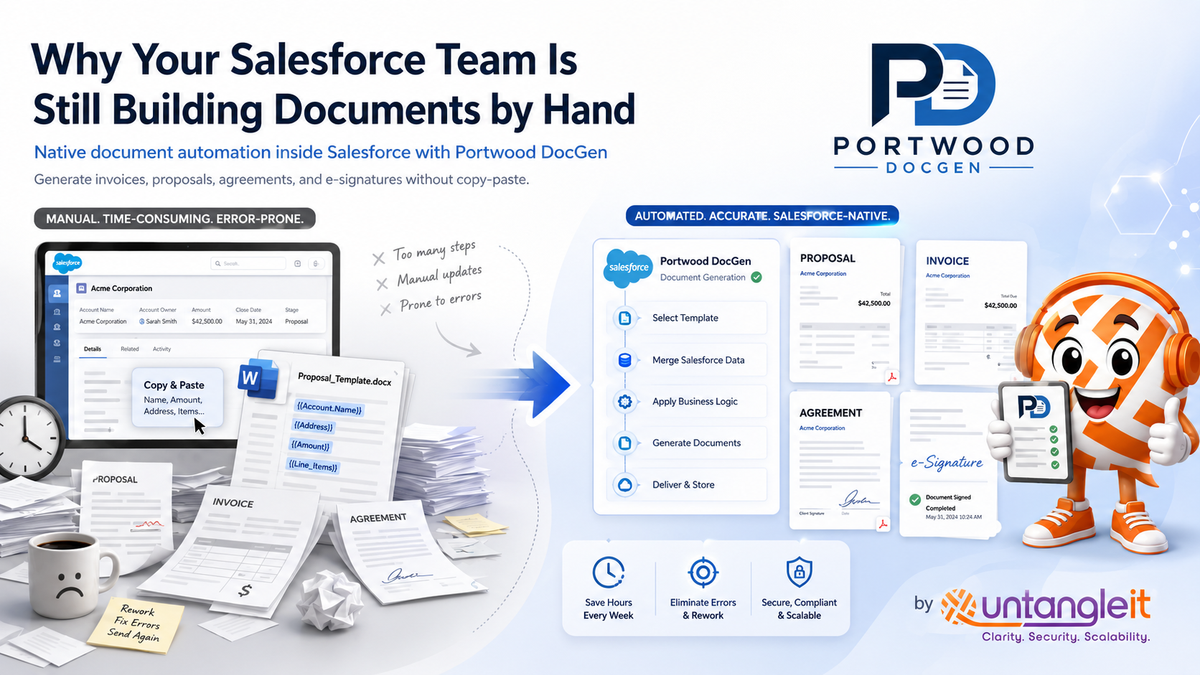
If your reps are still copying Salesforce data into Word templates by hand, the fix isn't a new habit. It's document automation built natively into your org.
It's the end of the month. A deal just closed in Salesforce. Someone on the team opens the opportunity, copies the account name, the contact, the line items, and the total, and pastes all of it into a Word template to build the invoice. Then they do it again for the proposal. Then again for the service agreement.
Nobody signed up to be a copy-paste machine. But in a lot of Salesforce orgs, that's exactly what document creation has quietly become.
We see this constantly with clients who've had Salesforce running for a year or two. The CRM captures everything correctly. The data is clean. But the moment that data needs to leave Salesforce and become a document a client can read, sign, or file, the process falls apart into manual work, or an expensive third-party tool nobody fully trusts.
In this post, we'll walk through why this happens, and how teams are fixing it without adding another SaaS subscription to the stack.
Why is my team still manually copying Salesforce data into Word documents?
Because Salesforce is built to store and manage your data, not to turn that data into a finished document on its own. That gap between "the data lives in Salesforce" and "the document needs to exist somewhere else" is what most teams end up filling with manual work.
Most teams solve that gap with one of two approaches, and both have real costs.
Manual copy-paste. Someone pulls the record open, transcribes the fields into a template, and emails it out. It works until volume increases, at which point it becomes the single most time-consuming part of closing a deal or onboarding a client. It's also where errors creep in: a wrong close date, a stale line item, a version of the template that's two updates out of date.
A paid document vendor bolted on top. Most third-party document tools solve the manual problem, but usually route your Salesforce data through an external service to render the document. That means a recurring per-user or per-envelope cost, a dependency on a vendor's uptime, and, in some cases, your client and deal data leaving your org to get rendered somewhere else.
Neither option is wrong exactly. But for a lot of SMBs and mid-size teams, both feel like overkill for something that should be simple: turn the data you already have into the document you already need.
How do I generate documents automatically from Salesforce records?
You connect a document template to your Salesforce fields using merge tags, then generate the finished document with one click, or one automated Flow, directly from the record. No copy-paste, no manual assembly.
Here's what that looks like in practice: a rep clicks a button on a closed opportunity. Salesforce pulls the account details, every line item, the total with tax calculated, and stamps a signature request onto it. Thirty seconds later, the client has a PDF invoice in their inbox with an e-signature link. No external vendor. No data leaving the org.
This is where a tool like Portwood DocGen fits into the picture. It's a free, open-source document automation app that runs natively inside Salesforce, built on Apex and Lightning Web Components with no external callouts. You start from a template your team already knows, Word, Excel, PowerPoint, or plain HTML, add merge tags for the Salesforce fields you want pulled in, and the app generates the document straight from the record.
The part that matters for most orgs isn't just "it fills in a template." It's what the templating handles on its own:
- •Related lists loop automatically — every line item on an opportunity, every donation on a donor record, without manual entry
- •Conditional logic applies pricing or clauses on the fly — an enterprise discount clause only appears if the deal is over a set amount
- •Totals calculate themselves — SUM, COUNT, and AVG across child records, so nobody's doing math in a Word doc
- •E-signature requests go out from the same flow — no separate e-signature subscription required
- •Barcodes and QR codes render natively — useful for invoices, tracking numbers, or field service work orders
And because it's genuinely free, there's no per-user fee creeping up as your team grows, and no data residency conversation about where client information gets processed. Portwood DocGen's Giant Query engine is also built to handle documents pulling from more than 50,000 related child records, using cursor-based pagination so a single template can generate one invoice or a bulk batch of thousands without any reconfiguration. For orgs with large product catalogs or years of transaction history, that's the difference between a tool that works in a demo and one that actually holds up in production.
Why are Salesforce teams choosing Portwood DocGen over paid document vendors?
Because the data never leaves the org, and there's no recurring bill attached to it. Portwood DocGen runs entirely on Apex and Lightning Web Components inside Salesforce, with zero external callouts, so client and deal data is never sent to a third-party server to get rendered into a document. Most paid document vendors route that data externally instead, which adds a dependency on the vendor's uptime along with the cost.
A few specifics worth knowing if you're comparing tools:
- •It's Apache 2.0 licensed and free forever — unlimited users, unlimited templates, unlimited documents, with no paywalled features or upgrade prompts blocking core functionality
- •E-signatures are built into the same app — no separate e-signature vendor to add on, no per-envelope fee, and every signature lands with a timestamped, tamper-evident audit trail stored directly on the record
- •Hebrew, Arabic, and other right-to-left languages are supported natively — no separate template branch or plugin required
- •It's open source — your team, or ours, can inspect, audit, or extend the code rather than trusting a vendor's black box
None of that makes it the automatic right call for every org. If you already have a paid tool that's working well, ripping it out just to save money isn't always worth the migration effort. But as a starting point for building document automation from scratch, especially for SMBs trying to avoid another recurring line item, it's one of the strongest options on the market right now.
What Salesforce workflows actually benefit from document automation?
Any workflow where a record change should produce a document benefits from being wired into a native tool like Portwood DocGen: a closed deal, a donation, a completed work order, or a signed agreement. Here's what that looks like across a few common setups:
Sales: A closed-won opportunity automatically generates a service agreement with the correct line items and total, routes it for e-signature, and stores the signed copy back on the record.
Nonprofits: A donation record triggers a receipt. A pledge triggers an agreement. A board meeting triggers an impact packet pulling from the year's donor activity, all generated and emailed without anyone manually assembling a document.
Field service: A completed work order generates an inspection report with photos, signatures, and a QR code for tracking, straight from the field record.
In each case, the document isn't a separate task bolted onto the workflow. It's a byproduct of the workflow that already exists in Salesforce.
Is it worth switching if our current document process technically works?
Only if the manual work or the recurring fees are actually costing you real time or money, not just to save on a subscription for its own sake. If your team is already on a paid tool and it's genuinely working well, there's no urgency to rip it out. But if document creation is still a manual task someone dreads every month, or you're paying per-envelope fees for e-signatures on top of a document tool you're also paying for, it's worth a serious look.
The upfront work is in template design and mapping the right Salesforce automation around it, not in the tool itself. That's usually where the real time gets spent, and it's also where getting it wrong costs you the most if it's rushed.
One of our clients, a services firm generating dozens of client agreements a month, was spending close to five hours a week on manual document assembly and chasing signatures across two separate tools. After we rebuilt their templates on Portwood DocGen and wired native document generation and e-signature into their existing Salesforce Flows, that dropped to under 30 minutes a week, and the signed documents live directly on the record where the whole team can see them.
If your Salesforce data is clean but your document process still runs on copy-paste, or you're curious whether Portwood DocGen fits your workflows, we'd love to help you untangle it.